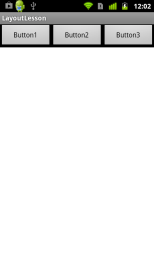
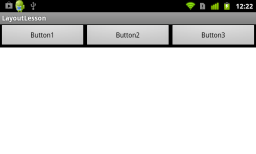
Androidでは端末の向きを回転すると、画面も自動的に回転するのが標準の動作である。
例えば、以下の様な挙動となる。
縦向き
横向き
しかし、横向きのときは専用のレイアウトで画面を配置し直したいこともある。
例えば、横画面は以下の様な配置にしたいときはどうすればよいだろうか?
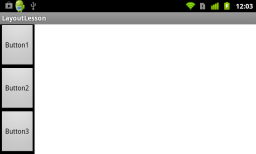
このようにしたいときは、resフォルダ下にlayout-landという名前のフォルダを作り、切り替えたい元のレイアウトxmlと同じ名前のファイルを配置すればよい。以下の様になる。
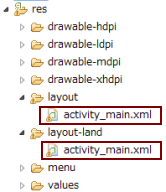
最後に、縦向き用と横向き用のレイアウトxmlを示す。
activity_main.xml (layoutフォルダ下に配置)
<RelativeLayout xmlns:android="http://schemas.android.com/apk/res/android"
    xmlns:tools="http://schemas.android.com/tools"
    android:layout_width="match_parent"
    android:layout_height="match_parent"
    tools:context=".MainActivity" >
    <LinearLayout
        android:layout_width="match_parent"
        android:layout_height="wrap_content"
        android:layout_alignParentTop="true"
        android:orientation="horizontal"
        android:background="@android:color/background_dark">
        <Button
	        android:id="@+id/button1"
	        android:layout_width="0dp"
	        android:layout_height="wrap_content"
	        android:layout_weight="1"
	        android:text="Button1" />
        <Button
	        android:id="@+id/button2"
	        android:layout_width="0dp"
	        android:layout_height="wrap_content"
	        android:layout_weight="1"
	        android:text="Button2" />
        <Button
	        android:id="@+id/button3"
	        android:layout_width="0dp"
	        android:layout_height="wrap_content"
	        android:layout_weight="1"
	        android:text="Button3" />
    </LinearLayout>
</RelativeLayout>
activity_main.xml (layout-landフォルダ下に配置)
<RelativeLayout xmlns:android="http://schemas.android.com/apk/res/android"
    xmlns:tools="http://schemas.android.com/tools"
    android:layout_width="match_parent"
    android:layout_height="match_parent"
    tools:context=".MainActivity" >
    <LinearLayout
        android:layout_width="wrap_content"
        android:layout_height="match_parent"
        android:layout_alignParentLeft="true"
        android:orientation="vertical"
        android:background="@android:color/background_dark">
        <Button
	        android:id="@+id/button1"
	        android:layout_width="wrap_content"
	        android:layout_height="0dp"
	        android:layout_weight="1"
	        android:text="Button1" />
        <Button
	        android:id="@+id/button2"
	        android:layout_width="wrap_content"
	        android:layout_height="0dp"
	        android:layout_weight="1"
	        android:text="Button2" />
        <Button
	        android:id="@+id/button3"
	        android:layout_width="wrap_content"
	        android:layout_height="0dp"
	        android:layout_weight="1"
	        android:text="Button3" />
    </LinearLayout>
</RelativeLayout>
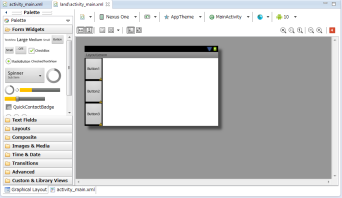
ちなみに、layout-land下に配置したxmlのグラフィカルレイアウトは、eclipse上でちゃんと横画面として表示されるので、なかなか便利である。