前回、Processで起動した別exeの標準出力をリダイレクトするアプリを作成した。
前回は標準出力を読み取るためにProcess#StandardOutput.ReadLine()メソッドを使った。
このメソッドは、標準出力があるまで現在の処理を止めてしまうため、別スレッドで実行させる必要があった。
そのため、やや複雑なプログラムを書いていた。
C#2.0から追加されたProcess#BeginOutputReadLine()メソッドを使うと、非同期に標準出力を読み取ることが出来る。
前回のプログラムを、このメソッドを使うように改良してみた。
以下に、そのプログラムを示す。
Form1.cs
using System;
using System.Collections.Generic;
using System.ComponentModel;
using System.Data;
using System.Drawing;
using System.Text;
using System.Windows.Forms;
using System.Diagnostics;
using System.IO;

namespace WindowsApplication1
{
    public partial class Form1 : Form
    {
        private Process process = null;

        public Form1()
        {
            InitializeComponent();
        }

        /// <summary>
        /// OnClosing処理
        /// </summary>
        /// <param name="e"></param>
        protected override void OnClosing(CancelEventArgs e)
        {
            // スレッド・プロセス終了
            if (process != null)
            {
                if (!process.HasExited)
                {
                    process.CancelOutputRead();
                    process.Kill();
                    process.WaitForExit();
                }

                process = null;
            }

            base.OnClosing(e);
        }

        /// <summary>
        /// ボタン押下時の処理
        /// </summary>
        /// <param name="sender"></param>
        /// <param name="e"></param>
        private void button1_Click(object sender, EventArgs e)
        {
            if( process == null )
            {
                process = new Process();

                ProcessStartInfo startInfo = new ProcessStartInfo("Win32ConsoleApplication");
                startInfo.CreateNoWindow = true;
                startInfo.RedirectStandardOutput = true;
                startInfo.UseShellExecute = false;

                process.StartInfo = startInfo;
                process.Start();

                // リダイレクトがあったときに呼ばれるイベントハンドラ
                process.OutputDataReceived +=
                new DataReceivedEventHandler(delegate(object obj, DataReceivedEventArgs args)
                {
                    // UI操作のため、表スレッドにて実行
                    this.BeginInvoke(new Action<String>(delegate(String str)
                    {
                        if (!this.Disposing && !this.IsDisposed)
                        {
                            this.textBox1.AppendText(str);
                            this.textBox1.AppendText(Environment.NewLine);
                        }
                    }), new object[] { args.Data });
                });

                // 非同期ストリーム読み取りの開始
                // (C#2.0から追加されたメソッド)
                process.BeginOutputReadLine();
            }
        }
    }
}
実行結果は前回と変わらない。
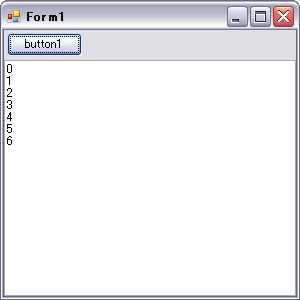
自分でスレッドを立てる処理を書かなくて良くなった分、プログラムが多少すっきりした。