データバインディングはWPFプログラミングでは必須と言っていい要素である。前回は、あるデータをそのまま別の要素のプロパティに適用していたが、実際にはそのまま使えないことが多いだろう。そのようなときにはConverterを使い、データ元の値を必要に応じて変換することになる。
Converterの簡単な使用例を示すため、以下のような画面を構築してみる。
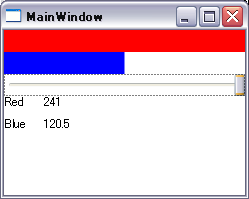
スライダーを動かすと、赤い四角形と青い四角形の幅が連動して変わる。
また、スライダーの下には青い四角形と赤い四角形の幅の値が表示される。
まず、このプログラムのxamlを示す。
MainWindow.xaml
<Window x:Class="WpfBindingLesson.MainWindow"
        xmlns="http://schemas.microsoft.com/winfx/2006/xaml/presentation"
        xmlns:x="http://schemas.microsoft.com/winfx/2006/xaml"
        xmlns:my="clr-namespace:WpfBindingLesson"
        Title="MainWindow" Height="199" Width="249">
    <Window.Resources>
        <my:MyConverter x:Key="myConverter" />
    </Window.Resources>
    <StackPanel Name="stackPanel">
        <Rectangle
            Name="redRect"
            Fill="Red"
            Width="{Binding ElementName=slider1, Path=Value}"
            Height="22"
            HorizontalAlignment="Left" />
        <Rectangle
            Name="blueRect"
            Fill="Blue"
            Width="{Binding ElementName=slider1, Path=Value,Converter={StaticResource myConverter}}"
            Height="22"
            HorizontalAlignment="Left" />
        <Slider
            Height="22"
            HorizontalAlignment="Stretch"
            Maximum="{Binding ElementName=stackPanel, Path=ActualWidth}"
            Name="slider1"
            Value="240" />
        <Grid>
            <Grid.RowDefinitions>
                <RowDefinition Height="22"></RowDefinition>
                <RowDefinition Height="22"></RowDefinition>
            </Grid.RowDefinitions>
            <Grid.ColumnDefinitions>
                <ColumnDefinition Width="40"></ColumnDefinition>
                <ColumnDefinition Width="*"></ColumnDefinition>
            </Grid.ColumnDefinitions>
            <TextBlock Grid.Column="0" Text="Red" />
            <TextBlock Grid.Column="1" Height="22"  Text="{Binding ElementName=redRect, Path=Width}" />
            <TextBlock Grid.Row="1" Grid.Column="0" Text="Blue" Margin="0,0,18,0" />
            <TextBlock Grid.Row="1" Grid.Column="1" Height="22"  Text="{Binding ElementName=blueRect, Path=Width}" />
        </Grid>

    </StackPanel>
</Window>
やや複雑なxamlになってしまったが、今回重要なのは19行目の
Width=”{Binding ElementName=slider1, Path=Value,Converter={StaticResource myConverter}}”
という記述である。
これまではBindingにElementNameとPathのみを指定していたが、ここで新たにConverterを指定している。このConverterが値の変換を受け持つことになる。
ここでConverterとして指定しているのは6~8行目で記述しているmyConverterというリソースである。
<Window.Resources>
    <my:MyConverter x:Key="myConverter" />
</Window.Resources>
そして、このmyConverterというのは、MyConverterというクラスのインスタンスである。
MyConverterはSystem.Windows.Data.IValueConverterインターフェースを実装したクラスで、c#のコードで記述されている。
そのコードを以下に示す。
MyConverter.cs
namespace WpfBindingLesson
{
    class MyConverter : IValueConverter
    {
        // 今回はこちらだけ実装 データ元の値を半分にする
        public object Convert(object value, Type targetType, object parameter, System.Globalization.CultureInfo culture)
        {
            return (double)value / 2.0d;
        }

        public object ConvertBack(object value, Type targetType, object parameter, System.Globalization.CultureInfo culture)
        {
            throw new NotImplementedException();
        }
    }
}
今回はConvert()メソッドのみ実装している。
その内容は、データ元の値を半分にして返しているだけである。
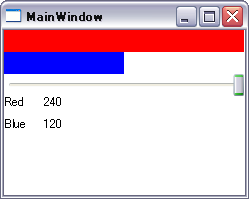
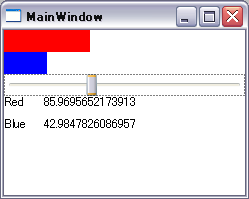
このConverterを青い四角形のWidthのBindingに指定することによって、青い四角形の幅はスライダーの値の半分となっている。
 |
 |